
IMAGE TO PENCIL SKETCH ONLINE FREE
Pencil Sketch Converter
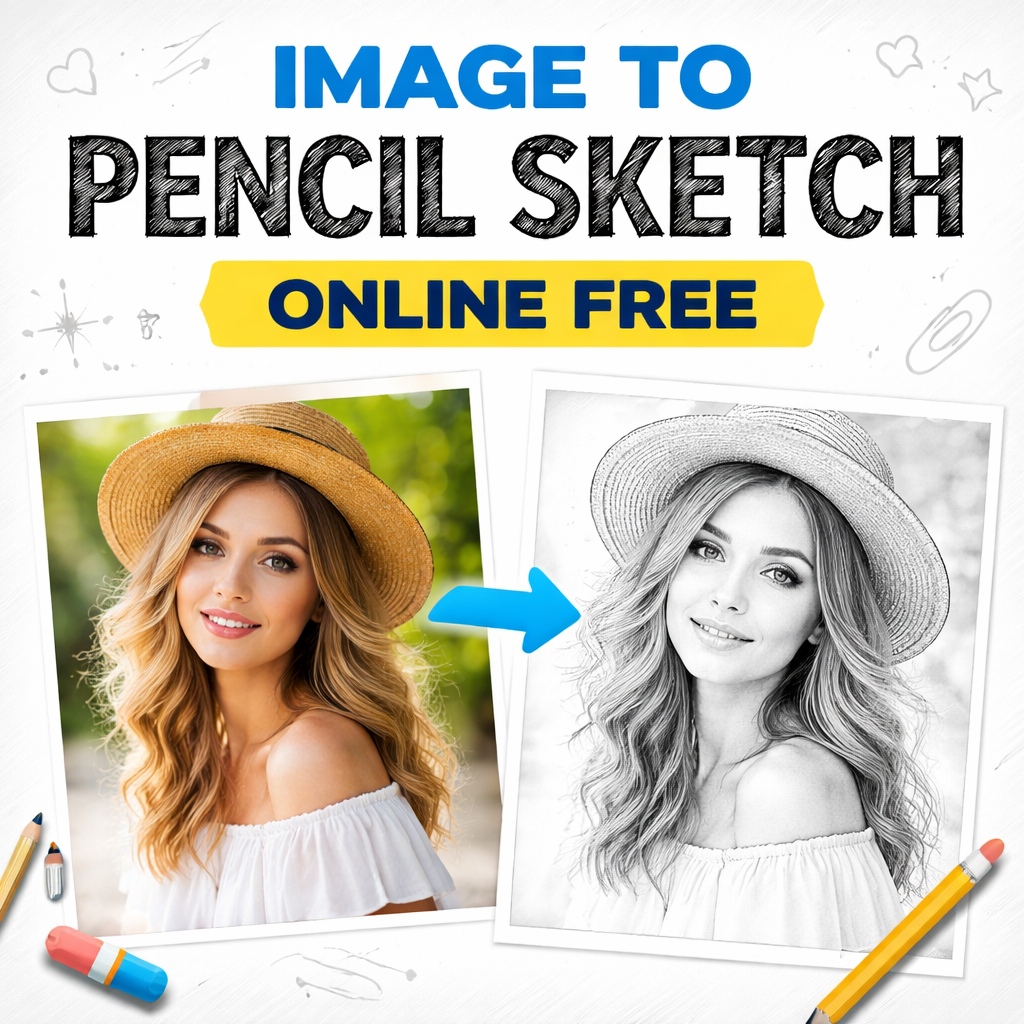
Creating an IMAGE TO PENCIL SKETCH online has become one of the most popular ways to transform ordinary photos into artistic visuals without needing drawing skills or expensive software. Today, anyone can convert a portrait, landscape, or product image into a realistic pencil sketch within seconds using free online tools.
An image-to-sketch conversion works by analysing edges, contrast, shading, and textures inside a photo and recreating them as pencil strokes. Modern web tools use advanced image-processing algorithms and artificial intelligence to mimic real graphite drawing styles. The result looks hand-drawn even though the process is fully automated.
Whether you are a content creator, student, designer, or social media user, converting photos into sketches can enhance creativity, improve visual storytelling, and add an artistic touch to digital content. This guide explains everything you need to know about using an IMAGE TO PENCIL SKETCH converter online for free, including benefits, working methods, best practices, and frequently asked questions.
IMAGE TO PENCIL SKETCH ONLINE FREE | Convert Photos into Artistic Sketches Instantly
An IMAGE TO PENCIL SKETCH tool allows anyone to transform a normal photograph into a beautiful hand-drawn style image within seconds. Earlier, creating pencil sketches required artistic skills, drawing tools, and hours of manual effort. Today, free online converters make this process simple, fast, and accessible to everyone.
Online sketch converters use smart image-processing technology to analyse outlines, shadows, and textures in a photo. The system then recreates those elements using digital pencil strokes, producing a realistic sketch effect. Whether you want a creative social media profile, artistic blog visuals, or personalised artwork, converting an image into a pencil sketch is now easier than ever.
One of the biggest advantages of using an IMAGE TO PENCIL SKETCH online free tool is convenience. You do not need to download software or learn complicated editing techniques. Most platforms work directly in your web browser. Simply upload your image, choose a sketch style, and download the final result.
These tools support multiple image formats such as JPG and PNG, making them suitable for photos taken from smartphones, cameras, or downloaded images. Many converters also allow adjustments like brightness, contrast, and sketch intensity so users can customise results according to their preferences.
Another reason for the growing popularity of sketch converters is their versatility. Content creators use sketch images to make unique posts that stand out on social media platforms. Bloggers use them to design creative featured images, while students often use them for projects and presentations. Even small businesses use pencil sketch visuals in marketing materials because they add a creative and professional touch.
Quality results depend largely on the image you upload. Photos with good lighting, clear subjects, and high resolution usually generate the best sketches. Dark or blurry images may reduce the clarity of pencil strokes. Choosing the right sketch style also matters. Some tools offer soft outline sketches, while others create deep graphite or charcoal effects for a dramatic look.
Security is another important factor when using online tools. Reliable platforms automatically remove uploaded files after processing, ensuring user privacy. It is always wise to use trusted websites that clearly mention their privacy policy.
The simplicity of these tools makes them suitable for beginners as well as professionals. Artists sometimes use sketch converters as a starting point before refining drawings manually. Designers use sketch effects for posters, logos, and creative branding elements. The ability to create artwork instantly without technical knowledge has changed how people approach digital creativity.
Beyond personal use, IMAGE TO PENCIL SKETCH conversion is also useful for gifting purposes. Many people convert portraits into sketches and print them as framed artwork. These personalised creations feel thoughtful and artistic while requiring minimal effort.
As technology improves, AI-powered sketch tools continue producing more realistic results. Modern converters can recognise facial details, textures, and depth, making sketches look closer to hand-drawn illustrations than simple photo filters. This advancement has made online sketch conversion one of the most popular image editing trends today.
IMAGE TO PENCIL SKETCH Guide | Benefits, Steps, and Practical Uses Explained
Using an IMAGE TO PENCIL SKETCH converter online follows a straightforward process that anyone can complete in a few simple steps. First, choose a reliable online tool that offers free sketch conversion. Upload your image using the provided upload option. Once the image loads, select your preferred sketch style and adjust settings if available. After previewing the result, download the finished sketch instantly.
Following a few best practices can significantly improve results. Always upload high-resolution images because they contain more details for the tool to analyse. Ensure proper lighting and avoid heavy shadows that may hide important features. If the tool offers multiple effects, experiment with different styles to find the most natural-looking sketch.
There are many practical applications for pencil sketch images. Social media creators use them to create eye-catching profile photos and artistic posts. Bloggers and website owners use sketch visuals to add a creative tone to articles. Teachers and students use sketch images in educational materials, while marketers apply them in promotional designs to create a unique visual identity.
Another advantage is time efficiency. Traditional sketching can take hours or even days depending on complexity, but online converters complete the same transformation almost instantly. This allows users to focus more on creativity rather than technical effort.
Free online tools also make digital art accessible globally. Anyone with an internet connection can create artistic visuals without investing in expensive software like professional design programs. This accessibility encourages experimentation and creativity among beginners who might otherwise hesitate to explore digital art.
When choosing a tool, look for features such as high-quality output, fast processing speed, mobile compatibility, and secure file handling. A clean interface also improves user experience, especially for first-time users.
In conclusion, an IMAGE TO PENCIL SKETCH converter provides a simple yet powerful way to turn ordinary photos into artistic creations. It saves time, removes technical barriers, and allows users to create visually appealing artwork effortlessly. Whether used for personal creativity, professional design, or social media content, online sketch tools offer a practical and enjoyable solution for transforming images into timeless pencil-style artwork.
What Is IMAGE TO PENCIL SKETCH and How Does It Work?
An IMAGE TO PENCIL SKETCH process converts a digital photo into a monochrome or shaded drawing style that resembles traditional pencil artwork. Instead of manually sketching, online tools automatically generate sketch effects through image analysis.
How the Conversion Process Works
Most online converters follow a structured workflow:
- Image Upload
Users upload a JPG, PNG, or WEBP image. - Edge Detection
The system detects outlines and contours within the image. - Grayscale Conversion
Colours are removed to focus on shading and lighting. - Texture Simulation
Algorithms replicate pencil strokes and shading depth. - Final Rendering
The sketch is generated and made available for download.
Advanced platforms use AI models trained on thousands of hand-drawn sketches, helping produce realistic results that closely resemble real artwork.
Types of Pencil Sketch Effects
Online tools usually offer multiple sketch styles:
- Light pencil outline
- Detailed graphite sketch
- Charcoal drawing effect
- Artistic shading sketch
- Cartoon-style sketch
Each style serves different purposes depending on whether you want realism or creativity.
Benefits of Using IMAGE TO PENCIL SKETCH Online Free Tools
Free online converters are widely used because they remove technical barriers and make digital art accessible to everyone.
1. No Drawing Skills Required
You do not need artistic experience. The tool handles the entire transformation automatically.
2. Instant Results
Most tools generate sketches within seconds, saving hours compared to manual drawing.
3. Cost-Free Creativity
Many platforms allow unlimited conversions without subscriptions.
4. Easy Accessibility
Since tools work in browsers, there is no need to install heavy software.
5. Social Media Ready Content
Sketch images perform well on platforms like Pinterest, Instagram, and blogs because they stand out visually.
6. Professional Use Cases
Businesses also use sketch conversions for:
- Marketing visuals
- Website banners
- Product illustrations
- Profile portraits
- Educational materials
7. Beginner-Friendly Interface
Most tools offer simple drag-and-drop functionality suitable for all users.
Step-by-Step Guide to Convert IMAGE TO PENCIL SKETCH Online
Converting a photo into a pencil sketch online is straightforward. Follow these steps for best results.
Step 1: Choose a Reliable Tool
Select a trusted online converter that supports high-quality image processing and secure uploads.
Step 2: Upload Your Image
Use high-resolution images for sharper sketch output. Blurry photos produce weaker results.
Step 3: Select Sketch Style
Choose between soft sketch, detailed sketch, or artistic sketch depending on your needs.
Step 4: Adjust Settings
Some tools allow customization such as:
- Contrast level
- Stroke intensity
- Brightness
- Edge sharpness
Step 5: Preview the Result
Always check preview mode before downloading.
Step 6: Download the Sketch
Save the image in PNG or JPG format for sharing or printing.
Best Practices for High-Quality Sketch Output
- Use images with clear lighting.
- Avoid overly dark photos.
- Ensure the subject is well-focused.
- Prefer high-resolution uploads.
- Experiment with multiple sketch styles.
Best Use Cases and Practical Applications of IMAGE TO PENCIL SKETCH
The popularity of sketch converters continues growing because they serve multiple creative and professional purposes.
Social Media Content Creation
Creators use sketch effects to create unique profile pictures and storytelling visuals that attract attention.
Blogging and Website Graphics
Sketch images provide a clean and artistic aesthetic ideal for headers and featured images.
Educational Projects
Students convert images into sketches for art assignments, presentations, and creative projects.
Digital Marketing
Marketers use sketch-style visuals for advertisements, posters, and promotional graphics.
Personalized Gifts
Turning a photo into a pencil sketch makes excellent personalized gifts such as framed portraits.
Branding and Design
Brands use sketch visuals for minimalist logos and illustrations.
Printing and Artwork
High-quality sketch conversions can be printed as wall art or posters.
FAQs — IMAGE TO PENCIL SKETCH
Q1: Is IMAGE TO PENCIL SKETCH conversion really free?
Yes, many online tools offer free conversion features. Some advanced styles may require premium access, but basic sketch effects are usually free.
Q2: Do I need software installation?
No. Most converters work directly in your browser, making them accessible on desktop and mobile devices.
Q3: Which image formats are supported?
Common supported formats include JPG, PNG, WEBP, and sometimes HEIC files.
Q4: Can I convert images on mobile?
Yes, online tools are mobile-friendly and work smoothly on smartphones and tablets.
Q5: Does converting images reduce quality?
Quality depends on the tool and original image resolution. High-resolution uploads usually maintain better output quality.
Q6: Are my uploaded images safe?
Reputable platforms automatically delete files after processing. Always use trusted websites with privacy policies.
Q7: Can I use sketch images commercially?
It depends on the platform’s licensing terms. Many tools allow commercial use, but checking usage policies is recommended.
Q8: What makes AI sketch tools better than traditional filters?
AI tools analyse depth, textures, and shading intelligently, producing more realistic pencil effects than basic filters.
Q9: How can I get the most realistic sketch result?
Use clear portraits with balanced lighting and adjust contrast settings before downloading.
Q10: Why is IMAGE TO PENCIL SKETCH popular today?
People enjoy artistic visuals without spending time learning drawing skills, making instant sketch conversion highly appealing.
Conclusion
The rise of free online tools has made artistic photo editing accessible to everyone. An IMAGE TO PENCIL SKETCH converter allows users to transform everyday images into creative artwork within seconds, without design experience or expensive software.
From social media creators to marketers and students, sketch conversion tools provide a simple way to enhance visual content while maintaining a professional artistic feel. By choosing high-quality images, experimenting with styles, and using reliable online platforms, you can achieve impressive results effortlessly.
If you want to add creativity to your photos, try converting your favourite image into a pencil sketch today and explore how digital tools can turn ordinary pictures into timeless artwork.